What Makes a Revit Family Heavy? A Deep Dive into File Size
One of the most overlooked factors in the design process within Autodesk Revit is a family's file size. While many components may appear visually simple, their internal structure-including the amount of geometry, parameters, formulas, and nested families-can significantly impact overall project performance.
This study aims to identify which specific elements contribute most to a family’s file size. To achieve this, a series of controlled tests were conducted using Metric Generic Model Adaptive families in Revit 2021, systematically varying the type and number of elements included.
The results were visualized and analyzed to:
pinpoint the heaviest contributors to file size;
develop practical guidelines for optimizing families to reduce size without sacrificing functionality.
Research Methodology
To understand which elements affect the size of .rfa files in Revit, I used an experimental approach: changing only one parameter at a time and recording how it impacted the file size.
Baseline Conditions:
Template used: Metric Generic Model Adaptive
Software: Autodesk Revit 2021
File size measured manually via Windows Explorer after cleaning the family
Reference file (no geometry or parameters): ~416 KB
Experiment Principle:
A single type of element was added (e.g., 10 lines)
The family was saved as a new file
The file size was compared to the baseline
Each test was repeated on a clean copy to avoid residual data traces
Test 1- Impact of 2D Modeling Tools on Family File Size
This section covers four types of elements commonly used in families that do not generate full 3D geometry:
Model Lines
Reference Lines
Reference Planes
Adaptive Points
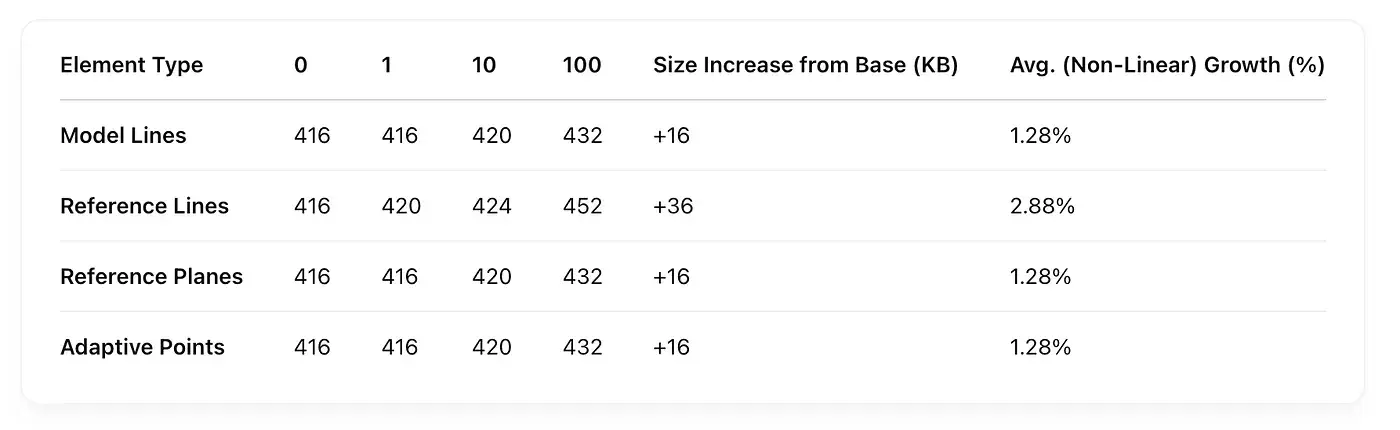
Each element type was tested across four complexity levels, from zero to one hundred objects. The results are shown below.
🔢 Effect of 2D Elements on .rfa File Size
📊 Findings
Lines and points have minimal impact on file size, even when used in quantities of 100. The increase usually stays within 4-16 KB.
Reference Lines contribute the most to file size - up to +8.6% over the baseline. This is likely due to the extra metadata they carry: direction, orientation, and positioning.
Reference Planes and Adaptive Points behave similarly to Model Lines, causing only a minor increase in file size.
These elements can be used freely when their quantity is in the dozens. However, it’s worth reviewing the family’s structure when used in the hundreds or thousands.
Test 2- Impact of Circles on Family File Size
Circles in Revit are closed curves that are technically more complex than straight lines - they store data about radius, center point, arc angle, and orientation. However, experiments show that their impact on file size is quite modest.
💡 Types of Circles:
Model Curves (circular) - drawn on work planes and visible in all 3D views.
Reference Circles (arc-shaped Reference Lines) - may assist in form generation but mostly serve as construction aids.
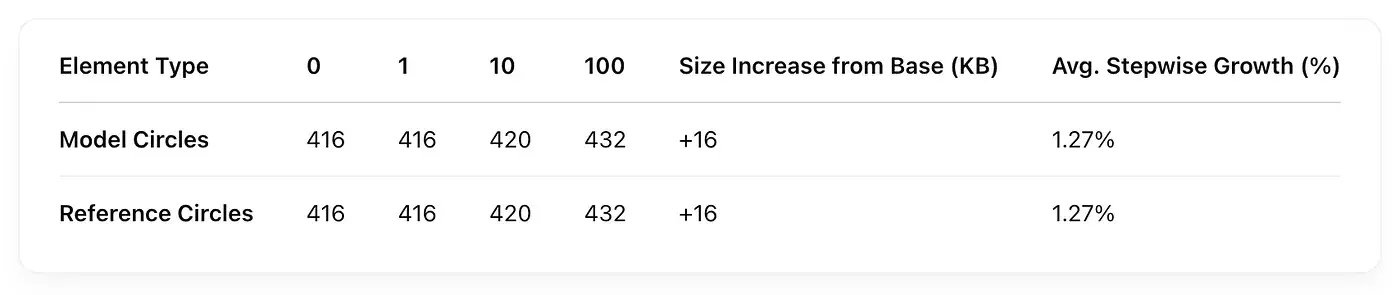
🔢 Effect of Circle Quantity on File Size
📊 Findings
Circles, like straight lines, have almost no impact on file size. Even 100 of them add only ~16 KB.
There’s no significant difference between the model and reference circles - both behave the same in terms of file weight.
This means you can safely use circles for graphics or construction lines without worrying about bloating your family file.
Note: This scenario does not include 3D forms based on circles (e.g., revolves, sweeps, circular arrays) - those are analyzed separately in the geometry section.
Test 3 - Impact of Point-Based Splines on Family File Size
A spline is a curve that passes through a series of points. In Revit adaptive families, splines are often used to define complex geometry and surface generation. This experiment tested how the number of points in a spline affects the resulting .rfa file size.
Two types were considered:
Model Spline - created on a plane and used in geometry construction
Reference Spline - used as a guide or control path and may influence geometry indirectly
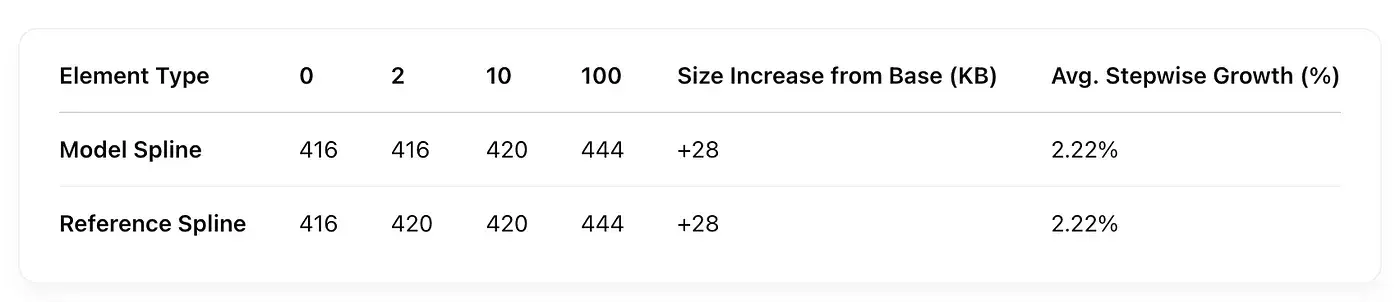
🔢 Effect of Spline Point Count on File Size
📊 Findings
Splines with a high number of control points (100+) significantly increase file size.
Even without generating 3D forms, a single 100-point spline curve can add ~28 KB - more than typical lines or circles.
Model and reference splines have the same impact, which suggests the file stores both the shape and control data regardless of their role.
Test 4- Impact of 3D Geometry on Family File Size
Solid 3D forms are the foundation of most Revit families. These are created using tools like extrusion, revolve, sweep, and more complex adaptive forms based on splines. This test evaluated how different types and quantities of 3D geometry affect .rfa file size.
The basic forms used in testing:
Cube (1×1×1 m prism)
Hexagon (hexagonal prism)
Cylinder
Sphere
Spline-based solid (curved swept form)
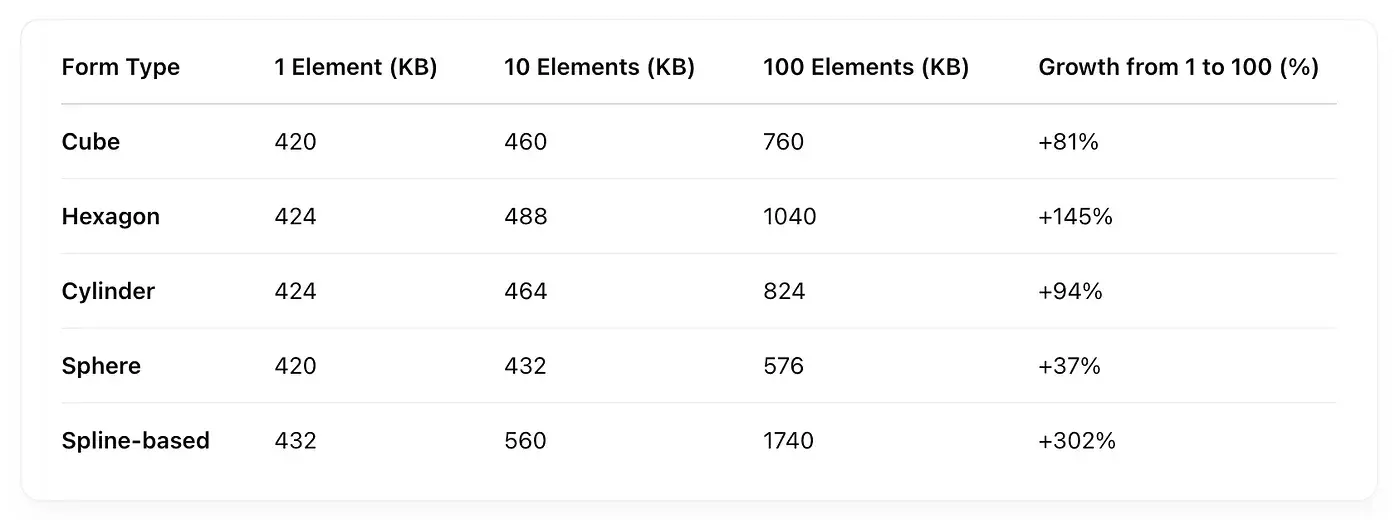
🔢 Effect of 3D Geometry on File Size
📊 Findings
3D forms cause the sharpest increase in file size compared to any other element type.Simple geometry (cube, cylinder) adds ~4-8 KB per element, but the growth becomes nonlinear as quantity increases (e.g., 100 elements).Complex spline-based geometry shows the largest increase among the individual form types tested. At 100 elements the detailed table reports 1,740 KB, or 1,324 KB above the 416 KB reference.The sphere is the “lightest” complex object - being closed and symmetrical, it requires less data to represent.Hexagons, despite their simplicity, consume more space due to the higher number of faces and edges.
Test 5- Impact of Parameters on Revit Family File Size
Parameters are one of the core tools for controlling behavior, appearance, and variability in Revit families. This experiment explored how increasing the number of parameters (family, shared, and type-based) affects the size of the .rfa file.
To illustrate this, a simple Fibonacci sequence formula was used. This method allowed for a gradually increasing computational load while keeping the logic straightforward and scalable. It served as an effective way to simulate growing family complexity by adding more parameters without introducing extra geometry or nested elements.
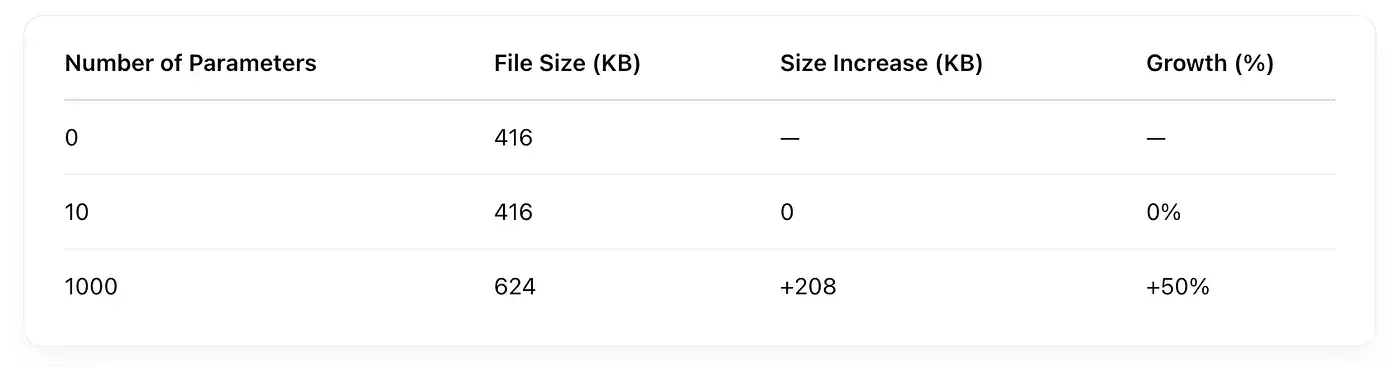
🔢 Impact of Parameter Count on File Size. No Geometry Present
Funny moment: I decided to generate a Fibonacci number using parameters to create continuous dependencies. I pushed it to 1000, and surprisingly, Revit calculated it pretty quickly.
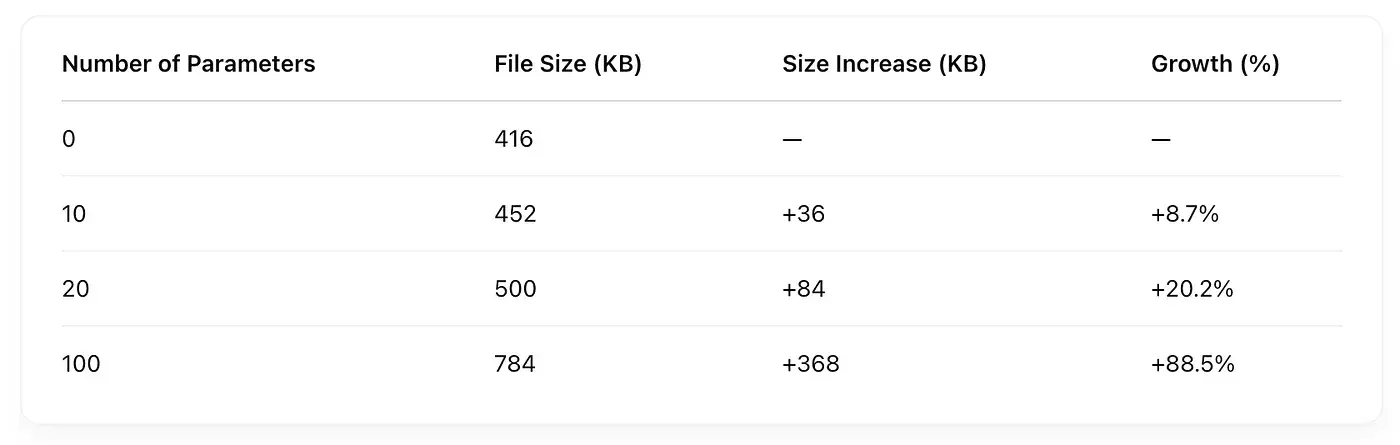
🔢 Impact of Parameter Count When Bound to Geometry
The geometry was linked to the formula to create a kind of “wave” effect.
📊 Findings
Without geometry, parameters have minimal impact on file size - even 10 or 100 add virtually nothing.
However, with 1,000 parameters, file size increases by ~50%, even without formulas.
When geometry is present, each additional parameter contributes more to file size - likely due to associations and dependencies between geometry and parameters.
The overall impact remains reasonable: even with 100 parameters tied to geometry, the file stays under 800 KB - acceptable for complex families.
Test 6- Impact of Family Types on File Size
Family types (also known as types) are preset combinations of parameters you can switch between in a project. They don’t add new geometry, just different values, formulas, or logic. Still, when you add many types, it raises the question: does the number of types affect the .rfa file size?
This experiment tested families with identical geometry and parameters but varying numbers of types - from 1 to 100.
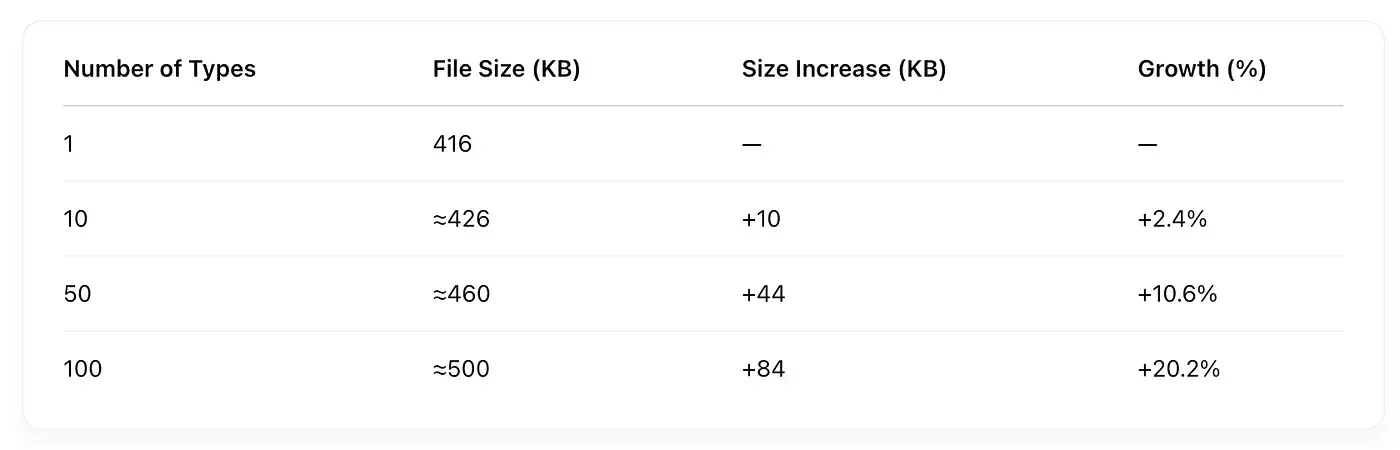
🔢 Effect of Type Quantity on File Size
Note: Exact values may vary depending on how many parameters are linked to each type.
📊 Findings
Yes, the number of types affects file size, but only moderately. Even 100 types add no more than 80-100 KB.
Each type is essentially just a data row with parameter values, and Revit compresses this information efficiently.
If types control geometry visibility using conditional parameters, the actual size may increase more significantly (see the section on conditional geometry).
Types ≠ of duplicated geometry. Adding types doesn’t multiply geometry. Growth is linear and manageable.
Test 7- Impact of Nested Families on File Size
Nested families allow you to build complex assemblies from reusable components. However, Revit embeds the entire content of the nested family - including its geometry, parameters, and type definitions - into the main .rfa file. This makes nesting powerful, but it can also dramatically increase file size.
The experiment explored:
Different nesting levels - simple, two-level, and three-level nesting
Varying numbers of identical nested family instances - to assess whether instance count affects total file size
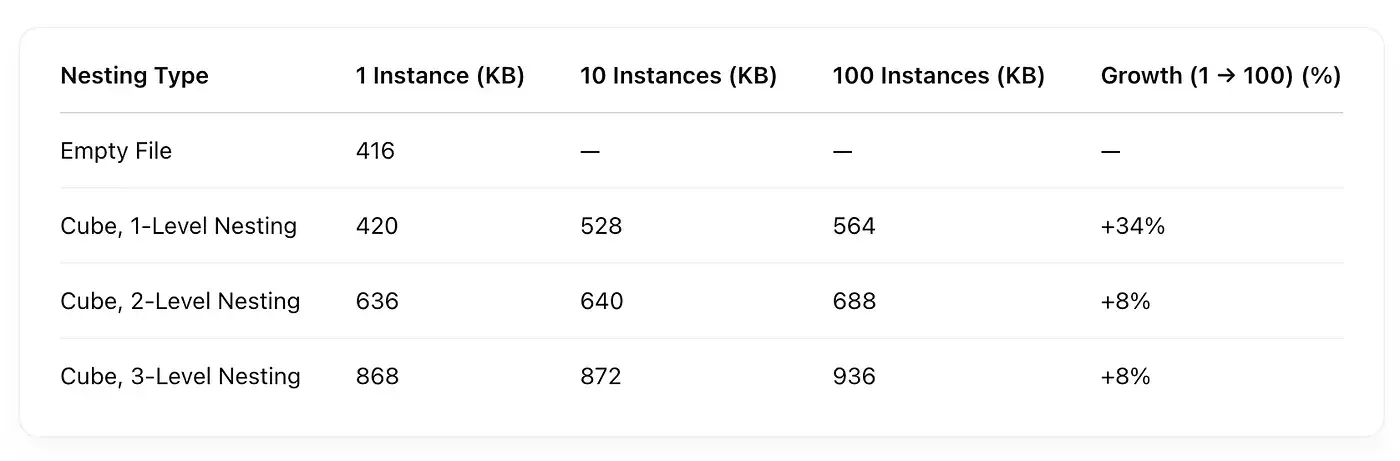
🔢 Impact of Nested Families on File Size
📊 Findings
The biggest file size jump comes from nesting itself - even a single instance of a 1-level nested family adds ~100 KB.For one-level nesting, the detailed table reports 420 KB at 1 instance, 528 KB at 10 and 564 KB at 100. The increase from 1 to 100 is 144 KB; the 36 KB difference refers to 10 to 100.Deeper nesting significantly increases file size, even with just one inserted component. A 3-level nested family weighs ~868 KB vs. 420 KB for a basic one.Revit does not duplicate the structure for each copy - only the first one is stored in full; others act as references.
Test 8- Impact of Purging on File Size
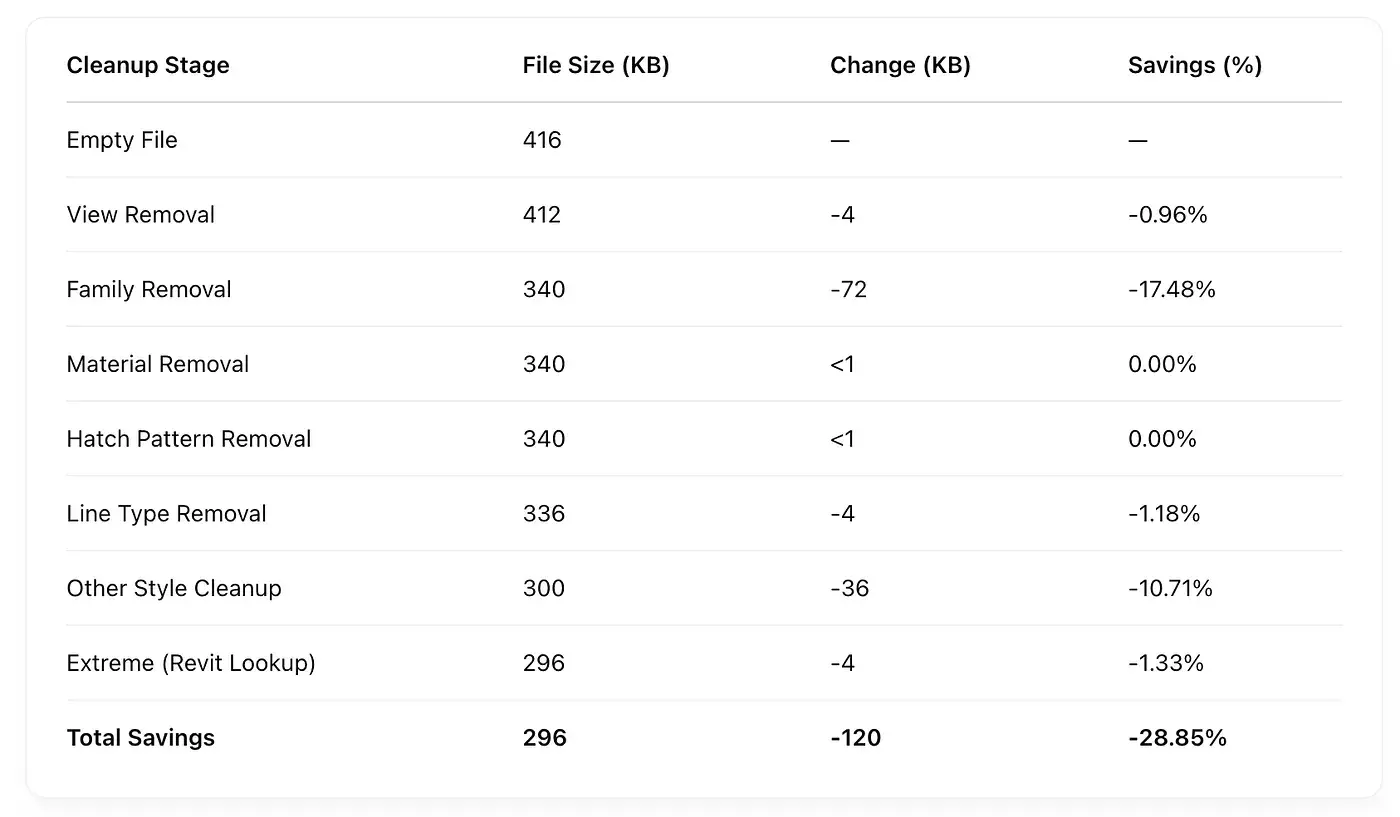
Revit .rfa files often retain hidden or unused data: inactive line types, hatches, materials, views, etc. These elements don’t appear in the model directly but still inflate file size.
This experiment measured the effect of step-by-step purging on a test family that had been manually filled with unnecessary data (unused styles, views, nested components, etc.), which were then removed one by one.
🔢 Effect of Removing Unused Data on File Size
📊 Findings
Removing unused families and styles has the biggest impact - just two actions (Purge Families and Clean Up Styles) can cut file size by over 100 KB.
Deleting views provides minor savings, especially if they’re leftover drafting views or templates.
Materials, hatches, and line types have little individual impact, but together, they add up to 5-10% of the total size.
Automated cleanup via Revit Lookup, Dynamo, or pyRevit can squeeze out a few more KB, especially when purging hidden or unused metadata.
Readable tables and downloadable data
The table below selects values from the published tables in this study. The complete download contains 76 file-size values transcribed from nine tables. This is a table transcription, not a new experiment or the original measurement log.
The study describes Autodesk Revit 2021 and the Metric Generic Model Adaptive template, with file sizes checked in Windows Explorer. The article's baseline is about 416 KB. Compare rows with their quantities and object types in mind: 100 forms and 1,000 parameters are different scenarios.
Selected values from the published Revit 2021 tables
The measured outcome is saved file size, not Revit runtime or memory consumption. These results do not automatically generalize to every family or a newer Revit release.
KB is retained exactly as labelled in the source tables. The figures are rounded and cannot recover precise byte counts. The ≈ marker is preserved where the published table marks an approximation.
The published material does not include the original .rfa files or measurement logs, and this export does not supply them. Every exported row points to the table image that can be used to check it.
The export transcribes file-size cells. It does not reproduce ambiguous average or stepwise-growth columns. Nested-family figures follow the detailed table, not the chart's normalized starting points.
Download all transcribed values
The CSV contains 76 rows. JSON groups rows by table, names their columns in row_columns and records source links in metadata.source_tables. All 76 values are preserved. A blank quantity for a cleanup stage does not mean zero elements.
📊 Overall Analysis: What Affects Revit Family File Size
Based on all the test scenarios, here’s a ranked comparison of which factors most impact .rfa file size, starting from a baseline of ~416 KB.
📋 Final Result. File Size Impact by Factor
🔑 Key Takeaways
The biggest culprit is complex 3D geometry.
Forms based on splines or surface manipulation drastically inflate file size. The published spline-based case with 10 forms is 560 KB, or 144 KB above the 416 KB reference. If it’s not essential for documentation, simplify it.
Nested families greatly increase file size.
Revit embeds the entire nested file - including geometry, parameters, and types. Just one nested component can add up to 400 KB.
Parameters only become heavy when tied to geometry.
Standalone parameters are light, but when they drive geometry (especially conditionally), file size spikes fast. 100 parameters + visibility logic can nearly double the file.
2D elements and family types have minimal effect.
You can safely use symbolic lines, planes, and types - just avoid bloating the project with unnecessary styles or view clutter.
Cleaning up is free optimization.
Drop 100+ KB with a couple of clicks: purge views, line types, materials, and unused content. It’s a no-brainer before publishing.
🧰 Best Practices for Optimizing Revit Families
🧾 Conclusion
This research tested the core elements that influence Revit family .rfa file size. It showed that family size is directly affected by:
The volume and complexity of 3D geometry
Use of nested components
The number of parameters - especially when linked with conditional geometry
File cleanliness - unused elements can bloat the file by 30% or more
Parameters, formulas, and types alone pose little risk. The real issue is when complexity, nesting, and over-parameterization stack up.
A good family isn’t the one that “does everything” - it’s the one that does exactly what’s needed: fast, lightweight, and clean.
Optimizing your Revit families is not just about performance - it’s a sign of respect for the next person who has to use your file.